Posts

Showing posts from 2008

Learning with ICT Tools

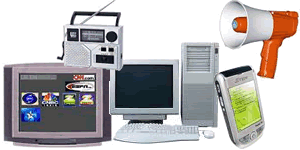
UNIT 7 Learning with ICT Tools How computers are used to support learning. Information and Communication Tools are equipments that are used to process data into information. They are also used for sending and receiving information. Some ICT tools are Computers, Mobile Phones, Radio and Television etc. In recent years, ICT has turned from being a technology of communication and information to a tool for curriculum creation that supports teaching and learning. Computers can be used in the classroom. They can help teachers to keep records of lessons and grades of all students in their class. Students can also use computers to study and do research through educational software or the World Wide Web. Accessing Information When students want to look for information they can use the Internet. The Internet is the largest network of computers and has a large amount of educational Information. By using search engines like Google, students can easily find articles and publications that are relate...
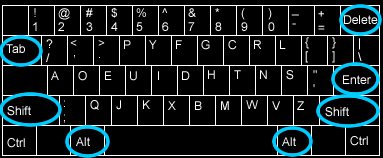
Introduction to Manipulative Keys

Image
UNIT 6 Introduction to Manipulative keys Keys with multiple functions On a Standard and Enhanced keyboard, there are keys that have more than one function. There are other keys that have been assigned to perform special functions. Such keys are known as manipulative keys . For example, the delete key is used to erase errors made when typing a text or clear unwanted files from the computers memory. It is also used in combination with the Alt key and the Ctrl key when you want to restart the computer. Let's take a look at some manipulative keys. Shift Key. The Shift key is a modifier key on a keyboard; it is used to type capital letters and other alternate "upper" characters. There are two shift keys on the keyboard. One on the left (below the caps Lock key) and right sides (below the enter key). Tab Key. The Tab key on a keyboard is used to move the cursor to the next "tab stop". Tab is the abbreviation for Tabulator. To tabulate, (tabulating) means to put someth...

Health and Safety Using ICT Tools

Image
UNIT 5 Health and Safety using ICT Tools. Uses of ICT Tools Information and Communicating Technology (ICT) tools are computer-based equipment used for processing data and communication. Some ICT tools are Television Public Address System Radio Mobile Phone Computer ICT tools are very useful in many other ways. We watch television programs for entertainment, education and information. The Public Address System is used for making community announcements by amplifying the voice of the user. The radio presents programs, music and discussions that keep us informed and entertained. The Mobile phone helps us to stay in touch with our friends, family and colleagues and finally the computer enables us to surf the Internet and communicate with other people online, it is also a form of entertainment because we can use it to watch movies and listen to music as well. Computers can also be used in businesses for communicating, desktop publication, sound editing. Although it is unlikely that using IC...

Opening Applications

Image
Opening Applications Application software is made to perform a specific task for the user. In this lesson you will learn how to open such applications on the Computer.   To open an application, 1. Click on the Start Menu 2. From the Start menu select All Programs . 3. Click on the Application you want to open and wait for it to load on the screen. 1. Click on the Start Menu 2. Select All Programs 3. Select the Application you wish to launch

Turning the Computer On and Off

Image
UNIT 4 Turning the Computer ON or OFF Turning the Computer ON The computer is electronic equipment - meaning it uses electricity. Electricity can be harmful if we don't work safely when using the computer. There is a basic procedure you must follow when turning the computer ON. If you want your computer to last long and work efficiently, you must always follow this procedure.     Steps you are to follow when turning the computer ON. Check all the cables connected to your computer. These wires carry electricity. So be careful when doing so. Make sure they are all well-connected. Check the main socket cable and switch. Make sure the plug is connected well before you turn the switch on. Make sure you remove all pen drives, removable hard disks, diskettes and any other removable storage device from the computer before turning it ON Press the Power button of the System unit and the Monitor. Note: These may be located at different parts on different personal computers Here are some ...

Keyboarding and Mouse Skills

Image
UNIT 3 Keyboard and Mouse Skills A keyboard is used to type and send commands to the computer. It is set up in the same format as a typewriter. There are two main types of keyboards. They are the Standard and Enhanced Keyboard. Standard Keyboard The standard keyboard is made up of three groups of keys. These are ten function keys, the alphanumeric keys and the numeric keypad. Enhanced keyboard The enhanced keyboard has five groups of keys. Apart from the three groups of keys, there are two more groups. These are the separate cursor control keys and the screen editing keys. Keys and their functions Every key on the keyboard has its function. A function is represented by a symbol and or a letter. If a key has two symbols on it, it can be used in two ways. The bottom symbol is the default symbol. To type the bottom symbol simply press the key. To type the symbol located at the top of the key, hold down the Shift key before you press the key. Keys with special functions   Shift...