Parts of a Personal Computer
UNIT 2
Parts of a Personal Computer
Parts of a Personal Computer
Components of a Computer
 The Personal Computer is made up of two main components; these are Hardware and Software components.
Hardware is are the physical and tangible components of a computer which we can see and touch, such as the mouse, keyboard, system unit, printer, monitor etc.
you can buy hardware from a computer store.
you can buy hardware from a computer store.
Software is a general term used to describe a collection of computer programs, procedures and documentation that perform some tasks on a computer system. Software cannot be seen or touched. Software can be stored in the computer's memory or hard drive or other storage devices.
How to use software.
 To feed a computer with software, you can type the software on the keyboard or insert a disk or a pen drive containing the software into the computer, you may also let the computer receive software from another computer on a network.
There are two main types of software. These are the Operating System software and Application Programs.
Operating System Software & Application Programs
Operating System Software is the most important system software. It tells the system unit how to handle the keyboard, mouse, monitor and the printer and other hardware devices. Some examples are the Windows Operating System and Linux Operating System.
An Application Program is software that is made to perform a specific task directly for the user, task such as calculating figures, sound and video editing, communicating via a network etc.
Types of Application Programs
Desktop Publishing Software enable the user to write letters, create flyers, cards, memo's, brochures, presentations etc. Desktop publishing software is useful in the business environment.
Enterprise software is used in a business setup to meet the needs of organizational processes and data flow. For example, accounting software can be used to record and process accounting transactions from various departments in an organization.
Media Editing Software allows a person to record and edit video or audio using the computer. This software is used by Film makers and Music artiste to produce quality sounds and pictures.
Educational Software is used for learning and conducting research. Educational software’s like the e-Student and Microsoft Encarta are used by students in many computer labs.
Content access software enables the user to explore the contents of a particular electronic media files, i.e. Media player, Web Browser, Video Player etc.
Simulation software is computer software for simulation of physical or abstract systems for research, training or entertainment purposes.
Main component's of a Computer System.
The main components of a computer system are the;
- Monitor
- System Unit
- Keyboard
- Mouse
The Monitor
 A visual display unit, simply called a monitor or display, is a piece of electrical equipment which displays images generated from the video output of devices such as computers, without producing a permanent record.
There are two types of monitors; these are the Monochrome (one color) and the Colour monitor. The latest type of monitor is called Flat panel display. It is thin and flat and uses a Liquid Crystal Display Screen (LCD), which does not produce a lot of heat. The older type of monitor which is bigger and wider is known as the Cathode Ray Tube (CRT) because it has a huge tube inside. CRT monitors produce a lot of heat and are analog or digital in quality.
Generally, monitors come in different shapes and sizes such as 12 inches, 14 inches, 17 inches, 21 inches and 27 inches. However the most common are 14, 15 and 21 inches.
The System Unit
 The System Unit is the main part of the personal computer because it does most of the thinking. Its parts are used to process data into information. The largest part you can find in the system unit is the Motherboard to which all other parts are connected. The casing of a system unit is usually made up of plastic or metal.
 Functions of the system unit can be divided into three main parts;
- Arithmetic Logic Unit
- Control Unit
- Memory
- Arithmetic Logic Unit: The Arithmetic Logic Unit is responsible for processing calculations such as addition, subtraction, multiplication, division and Logical operations that need to be processed.
- Control Unit: The control unit can be thought of as the brain. It decodes the instructions it receives from commands issued by the user and instructs other parts of the system unit to work in order to achieve the specified results.
- Memory: The Memory stores information that the computer can use later.
The Mouse
 The Mouse is an input device also known as a pointing device that moves a pointer on the screen when you slide it across your desk. The mouse is used to point, select or manipulate items on the screen. For example, the mouse can be used to draw on the screen.
 The Keyboard
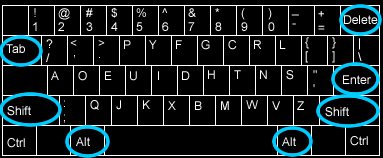
A keyboard is an input device used to feed the computer with data. When we type on the keyboard it sends data into the system unit to be processed.

Comments
Post a Comment